An AI assistant in your browser's side panel
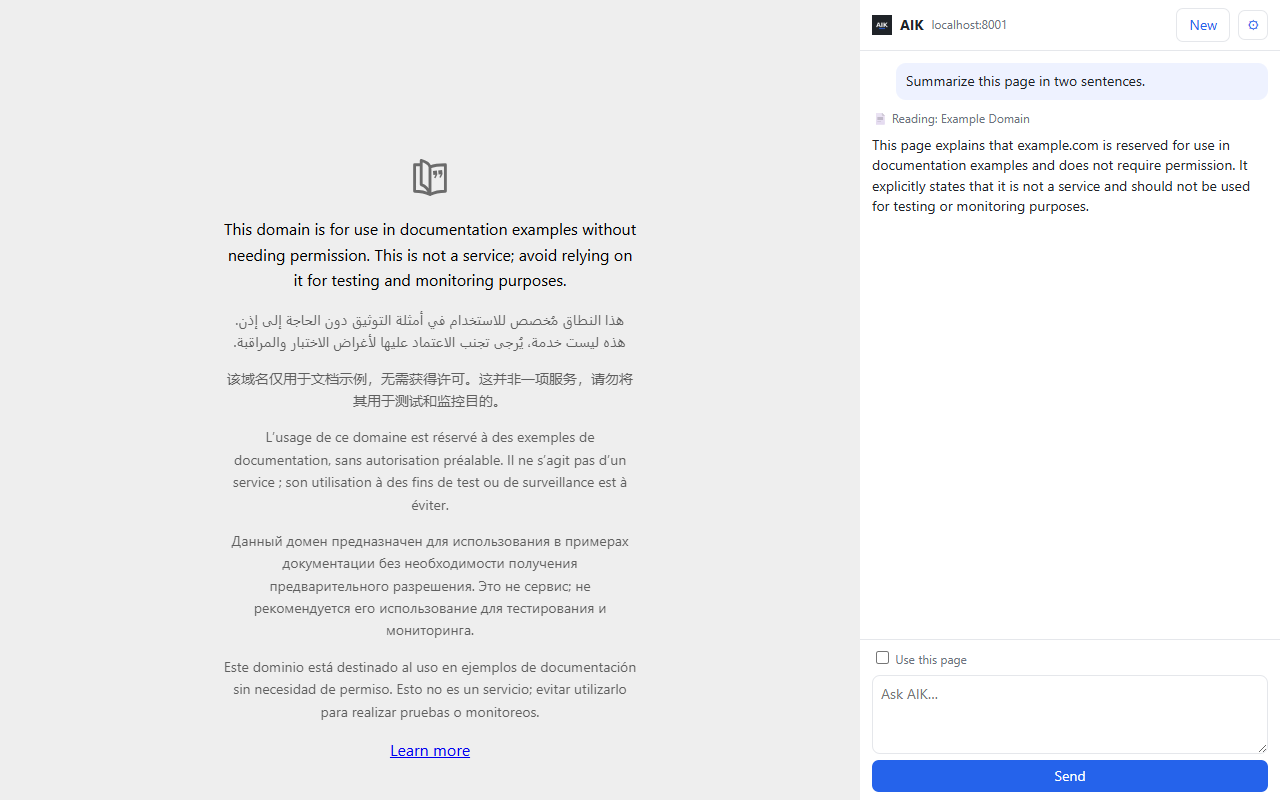
Press one button in Chrome or Edge and your AIK opens beside the page. Ask about what you are reading, or give it work, without leaving the tab.
What it does
- Answers about the page you are on. Write "summarize this page" or tick Use this page. The panel shows which page it read, so you always know what the answer is based on.
- Does the same work as AIK. It is your full AIK chat: run an agent, process documents, get a file. Approvals, plans and files work in the panel as they do on the AIK page.
- Answers in the language you ask in. An English question about a Bulgarian page gets an English answer.
It reads a page only when you ask
A browser add-on is a lot to trust, so it was built to ask for as little as possible:
- Page text is read only when you ask about "this page" or tick the box. Nothing is read in the background, and nothing from other tabs.
- It does not ask for all websites when you install it. The first time you ask about a page on a site, the browser's own question asks whether AIK may read that site.
- The text goes only to your AIK, and from there to the AI model you chose, like any chat message. With a cloud account your AIK is on aikautomation.com; with an install it is on your own server. The button sends it nowhere else.
- Page text is passed on marked as data, not as instructions. Only the page's name stays in the conversation.
- It is not used for advertising, selling, profiling or training AI models.
The full text is in the privacy terms.
Anything that goes out still needs your OK
The panel uses the same chat as the AIK page, so AIK's rule holds here too: anything that would send or post waits for your Approve button.
No second sign-in
Open AIK once in that browser and the panel is signed in. The add-on takes the sign-in only from AIK's own pages.
Your company's own AIK
If your company runs AIK on its own server, press ⚙ in the panel and enter its address. The panel then works with that AIK, and page text goes to your company's server.
How to install it
Open AIK in the Chrome Web Store and press Add to Chrome. In Edge, the same page offers to allow extensions from other stores first.
Then pin the AIK icon and open AIK once in that browser, and the panel is signed in.
Frequently asked questions
Does it read every page I visit?
No. It reads a page only when you ask about it or tick Use this page. While the panel is open it notes which tab is in front, so that it reads the right one when you ask.
Where does the page text go?
Only to your AIK, and from there to the AI model you chose, like any chat message. With a cloud account your AIK is on aikautomation.com; with an install it is on your own server.
Which browsers does it work in?
Chrome and Edge.
Do I have to sign in again?
No. Open AIK once in that browser and the panel uses that sign-in.
Can it work with our company's own AIK?
Yes. Press ⚙ in the panel and enter your AIK's address.
Can it send something from the panel?
Only after your OK. Anything that sends or posts waits for your Approve button.
What does it keep?
The address of your AIK and your sign-in, in the browser's storage for the add-on. The conversation lives only while the panel is open.
How do I remove it?
Remove the add-on in the browser. That removes what it stored.